

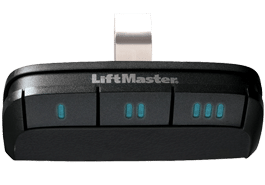
The Clicker Won’t Click
We have all been there. You pull into the driveway after a long day, perhaps it’s raining, or maybe you’re just carrying too many groceries. You press the button on your visor for your garage door to open, expecting the familiar hum of the garage door rising, and nothing happens. You press it again. Harder. Still nothing.
Before you panic and call a repair technician to look at the motor, take a breath. In the vast majority of cases, the mechanism that lifts your heavy garage door is fine. The issue lies in the small device in your hand. The remote has simply run out of power.
How To Replace Your Remote Battery
Changing a garage door remote battery is one of the easiest home maintenance tasks you can perform, yet it often causes hesitation because every remote looks a little different. This guide will walk you through the logic of how these devices are powered, how to safely access them, and how to restore your access to your home.
1. Diagnosing the Issue: Is it Really the Battery?
Before you crack open the remote, look for the tell-tale signs of a degrading power supply. Garage door remotes rarely fail "all of a sudden" unless they are physically broken. Instead, they usually exhibit a gradual loss of signal strength.
-
Decreased Range: A few months ago, you could open the door from the street. Now, you have to be halfway up the driveway. This indicates the voltage is dropping, weakening the radio frequency (RF) signal sent to the opener.
-
Inconsistency: The door opens on the first try this morning, but takes three tries this afternoon.
-
The LED Light: Most remotes have a small red or green LED. If this light is dimming or flickering when you press the button, the battery is almost certainly near the end of its life.
Quick Test: If you have a wall-mounted button inside your garage and it still opens the door correctly, your garage door opener motor is healthy. The problem is isolated to the remote.
2. Determining the Battery Type
Garage door remotes generally rely on one of two specific power sources, chosen by manufacturers for their compact size and longevity. It is best to open your remote before driving to the store to ensure you buy the right one.
-
Coin Cell Batteries (Lithium): These look like shiny silver buttons. The most common model is the CR2032 (3-volt). These are popular in modern remotes because they are thin and lightweight.
-
Cylinder Batteries (Alkaline): These look like miniature versions of the standard AA battery you use in a TV remote, but much smaller. The most common model is the A23 (12-volt).
3. How to Open the Housing
This is the part where most homeowners get nervous about breaking the plastic. Manufacturers design these cases to be secure, but accessible.
-
Locate the Seam: Look at the side of the remote. You will likely see a line running around the perimeter where the two halves of the plastic shell meet.
-
Check for Screws: Older models often have a small Phillips-head screw on the back holding the case together. If you see one, remove it first.
-
The "Twist" Technique: If there are no screws, you need to pry the case apart. Find a small indentation along the seam. Insert a flathead screwdriver or even the edge of a coin into the slot.
Pro Tip: Do not try to "pry" it open like a crowbar, which can snap the plastic tabs. Instead, insert the tool and twist it like a key. The torque will pop the case open cleanly.
4. Replacing the Power Source
Once the case is open, you will see the green circuit board and the battery.
-
Slide it out: If it is a coin cell, it usually slides out from a metal holder. If it is a cylinder, it pops out like a toy battery.
-
Check the Polarity: This is crucial. For coin cells, the Positive (+) side (the side with the writing on it) usually faces UP toward you. If you install it upside down, the circuit will not complete, and the remote will not function.
-
Inspect the Contacts: While the battery is out, look at the metal contacts in the remote. If they look rusty or dirty, give them a quick wipe with a cotton swab and a tiny bit of rubbing alcohol to ensure a clean electrical connection.
5. Reassembly and Testing
Snap the two halves of the plastic shell back together. You should hear a distinct click as the plastic tabs lock into place. If you removed a screw, tighten it back in—but not too tight, or you might crack the case.
The Big Question: Do I need to reprogram it?
Homeowners often fear that removing the battery will wipe the remote’s memory.
-
The Good News: In 99% of cases, no. The codes are stored on a non-volatile memory chip inside the remote, which retains information even without power.
-
The Exception: If the remote has been without a battery for a very long time, or if the device is extremely old, you might need to re-pair it with the opener unit (usually by pressing the "Learn" button on the motor unit in the ceiling).
Changing your garage door remote battery is a five-minute fix that saves you a service call fee and the frustration of being locked out. By understanding how the signal works and knowing how to safely manipulate the housing, you can ensure your home remains accessible and secure.
A Note on Disposal
Please remember that button-cell batteries (the coin-shaped ones) can be extremely dangerous if swallowed by small children or pets. Do not leave the old battery on the kitchen counter; wrap it in tape and dispose of it immediately according to your local recycling guidelines.
Still Having Issues?
Call the pros at Aaron Overhead Doors at 831-219-8648 and schedule your garage door opener service or contact us online with any additional questions.
Related Articles